The Comgate payment gateway is designed for payments with accommodation portal cards. This feature is used by accommodation providers who showcase their offerings on one of the online booking platforms, such as Booking, Expedia, Agoda, or accommodation portals that issue cards through the Mastercard B2B Travel program.
What are accommodation portal cards?
Accommodation portal cards are virtual cards issued by accommodation portals to their clients - accommodation providers. These cards are loaded with funds for bookings made by customers through the accommodation portal.
It is a type of payment card that exists only in digital form and cannot be presented physically for payment. It usually contains the same information as a regular card, such as the card number, expiry date and security code (CVV). These cards are often created for one-off or short-term transactions, such as online purchases, hotel or flight bookings.
Terms of Service
This service is optional and must be requested at the time of contracting. Existing clients can then contact our customer support.
In order to use these cards for payments, you must have:
a functional website of your accommodation, or at least a link to the presentation of the accommodation on a specific booking platform (e.g. Booking)
a payment service agreement with Comgate (either for payment gateway or terminal)
Fees
Payments by accommodation portal cards are charged at a flat rate for all tariffs.
Processing payments from Booking.com, Expedia, Agoda and other accommodation portals | 2.5 % + 1 Kč |
Processing payments from accommodation portals in Mastercard B2B Travel program | 3.0 % + 1 Kč |
How to use the card
The platform where you advertise (e.g. Booking) issues a card containing the funds for the reservation.
You then transfer the funds from this card to your bank account by creating a payment in the Client Portal and paying via the payment gateway. We will then transfer the funds to your account on the next business day.
You can entrust payment by this card to anyone in your team to whom you grant access to the Client Portal (e.g. your accountant). You also avoid the time-consuming manual entry of individual card details into a terminal (as was previously the case), and there is no longer any need to have a physical terminal with you.
Creating a payment in the Client Portal
Go to your Client Portal.
In the Payments → Booking sites tab, click the +New payment button.

Fill in the payment details:
Shop: Select the store through which the payment will be made.
Amount: Enter the amount to be paid out (the amount on the virtual card).
Bank account: Select the account to which we should transfer the funds.
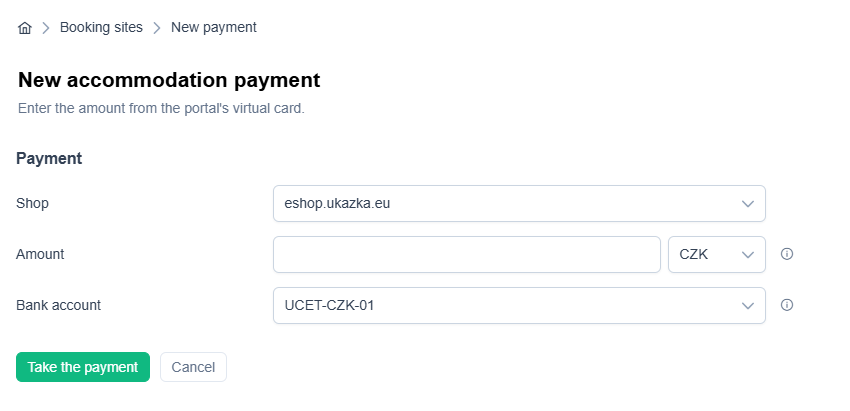
Click Take the payment and then the Pay button.
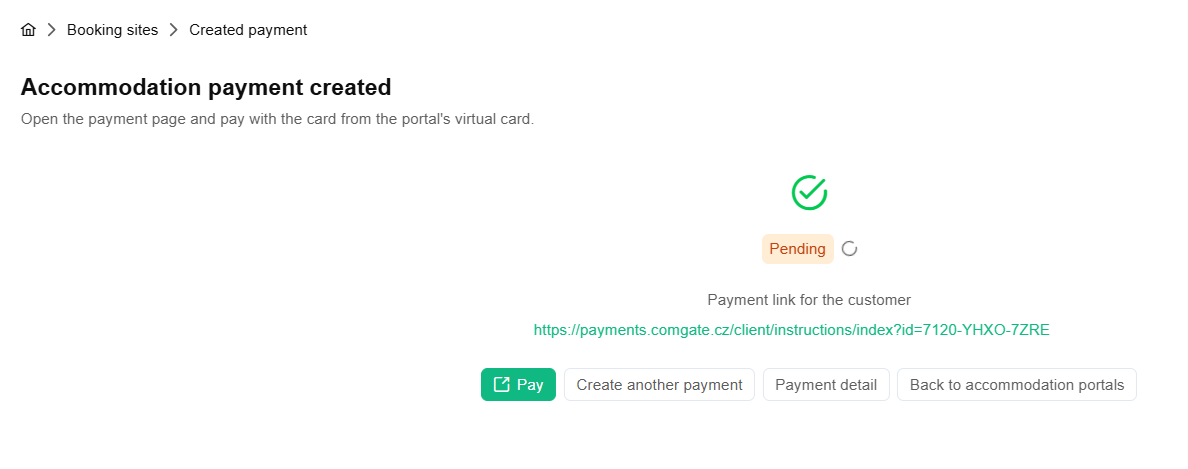
Make a card payment on the payment gateway. Enter the details from the virtual card.